

Music transforms video content. The right track elevates emotion, keeps viewers engaged longer, and gives your content a professional feel that silence or poor audio cannot match. For YouTube creators at every level, finding the perfect song is often the final piece that makes a video feel complete. Yet the moment that upload button is pressed, an automated system scans every second of your audio against a database of millions of registered songs, and if it finds a match, your revenue disappears, your video gets blocked, or in the worst cases, your entire channel gets taken down.
For a platform that uploads 500 hours of video every single minute, the scale of this problem is enormous. This makes it clear that understanding how to use music in YouTube videos legally is not optional for serious creators. Copyright law exists to help make sure that artists get paid when people use their work, and that’s where YouTube’s music policy comes into play.
This guide cuts through the confusion and gives you every legal method available for using music in your YouTube videos. We cover how YouTube’s Content ID system actually works, the critical difference between copyright claims and copyright strikes, every licensing option from free to premium, the truth about fair use, common myths that get creators in trouble, and a platform-by-platform breakdown of the best royalty-free music sources.
How YouTube’s content ID system works
Before choosing a music source, you need to understand the system that governs every video you upload. YouTube’s copyright and monetization systems sit on top of Content ID. A recognition system that compares your audio against a database of registered music and then allows rights holders to decide what to do: block, claim revenue, track, or share.
According to YouTube’s official Help Center, when a Content ID match is found, the copyright holder chooses one of four actions:
- Monetize: Ads run on your video, but the revenue goes entirely to the copyright holder and not you. Your video stays up, but you earn nothing from it.
- Track: The copyright holder monitors your video’s viewership data. No immediate consequence, but they reserve the right to change their policy at any time.
- Block in some regions: Your video becomes unavailable in specific countries or regions where the copyright holder has restrictions.
- Block worldwide: Your video is completely removed from YouTube or muted, thereby making it unwatchable everywhere.
A copyright claim isn’t the same as a strike, but it will still hurt. The result for you is always one of four outcomes: no claim (you keep full monetization), claim but allowed (video stays up but revenue goes to the music owner), claim and shared (Creator Music-style revenue split), or strike (your video gets taken down).
Copyright claims vs. Copyright strikes: Know the difference
This distinction is critical and widely misunderstood.
A Content ID Claim is an automated flag. It does not count against your channel’s standing. It means a rights holder has identified their music in your video and applied one of the four policies above. You can dispute claims you believe are wrong, but this triggers a review by the rights holder and not YouTube.
A Copyright Strike is far more serious and much worse. On one strike, your video will get taken down. On the second (before the first one expires), your channel will stay restricted for another 90 days. A third strike means your channel will be automatically deleted, all content removed, and you’ll be banned from creating new channels. In more serious cases, legal action might follow.
Strikes typically come from formal DMCA takedown requests filed by music labels, publishers, or distributors, and not from the automated Content ID system. The distinction matters because your response strategy differs entirely for each.
6 Legal methods for using music in YouTube videos
Using music in YouTube videos can boost engagement, but using it the wrong way can lead to copyright strikes or demonetization. While it might seem hard to understand how the usage of music works on YouTube, this guide breaks down six legal methods you can use to add music safely and confidently to your content:
Method 1: YouTube audio library
If you’re just starting or don’t want to worry about licensing, the YouTube Audio Library is the easiest way to get copyright-safe music and sound effects for your videos, and it’s completely free. It may not have viral or trending songs, but it’s a great starting point for background music, intros, or sound effects without the risk of copyright claims.
How to access it:
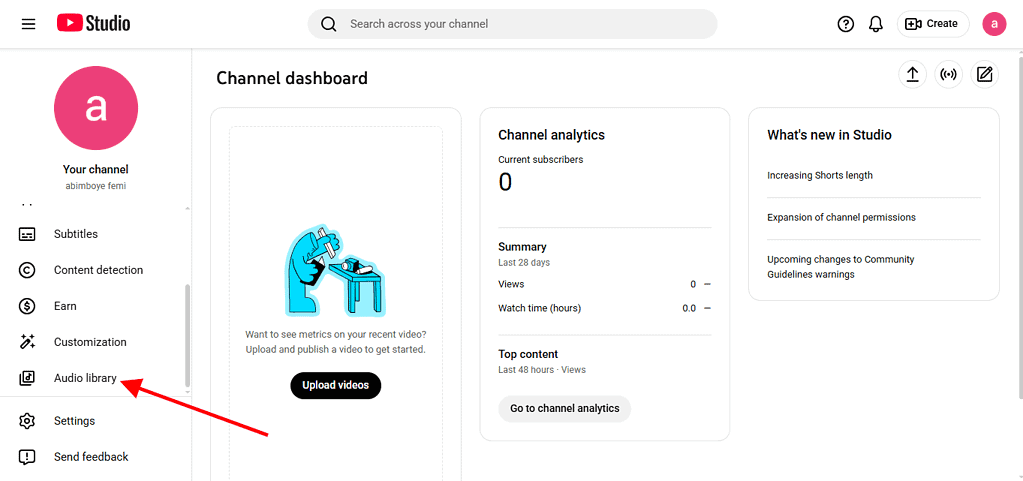
- Log in to your YouTube account and go to YouTube Studio.
- From the left-hand menu, scroll down and click Audio Library.
- Browse by genre, mood, duration, and attribution requirements.
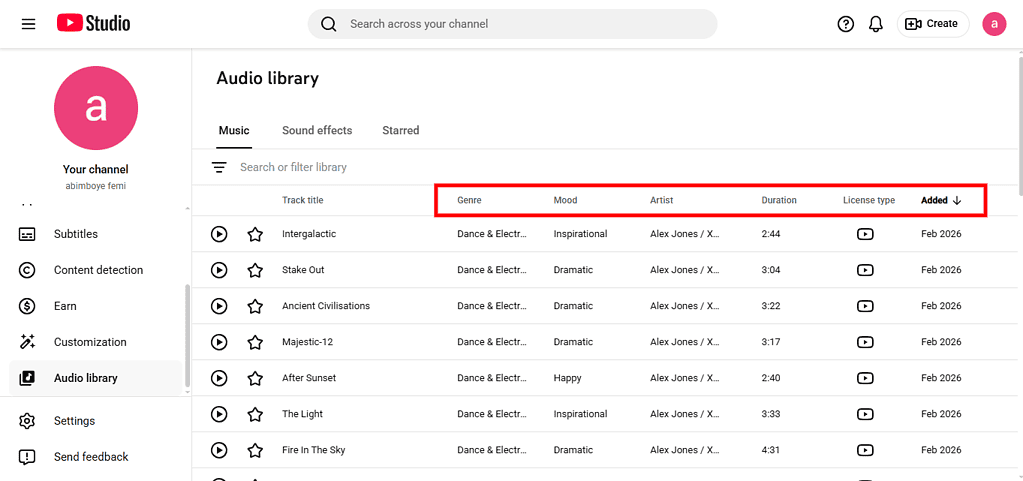
- Download any track and use it freely in your videos.


Some tracks require attribution, where you must credit the artist in your video description. Others are completely free with no strings attached. Always check the license terms on each track before downloading.
Method 2: YouTube creator music
Creator Music is YouTube’s native licensing solution for monetized creators. YouTube has a music licensing service called Creator Music that allows creators to find and use original and copyrighted music for monetized YouTube content. YouTube Partner Program creators can license music from artists in two different ways: buy a license or share video revenue with the music rights holder.
In the revenue-sharing model, you use the licensed song without an upfront cost, but a percentage of your video’s ad revenue goes to the rights holder. You keep the rest. On the other hand, the license purchase model requires you to pay a one-time fee for full revenue retention. Prices vary by song, channel size, and usage scope.
Creator Music integrates directly with YouTube Studio, making licensing seamless and claim-proof within the platform. This is the most straightforward path to using commercial music on YouTube without losing monetization.
Method 3: Royalty-free music libraries

“Royalty-free” does not mean free. It means you pay once (or subscribe) and then use the music in unlimited projects without paying ongoing royalties. When you use royalty-free sites like Audio Jungle, Epidemic Sound, or Artlist to obtain music for your video, you are effectively obtaining a license that grants you the rights to reproduce, synchronize, and use the music within that specific production.
Top platforms for royalty-free music include:
- Epidemic Sound: Monthly subscription grants access to 40,000+ tracks. Covers YouTube and all other social platforms. Claims are automatically cleared for your linked channels.
- Artlist: Annual subscription. Unlimited downloads, perpetual licensing, and music cleared for commercial use globally.
- Soundstripe: Soundstripe owns every single song in its library, so you won’t find their music anywhere else. That means you won’t have to worry about copyright claims anymore. Subscription-based with both per-song and unlimited licensing tiers.
- Musicbed: Premium catalog with higher production quality, popular with cinematic and commercial creators.
This option is best for monetized creators who post consistently and need a reliable, claim-free music pipeline. However, a monthly or annual cost is attached, and there are no mainstream or chart-topping artists.
Method 4: Licensing popular music directly
If you want to use a specific mainstream song from an artist you love, direct licensing is your only guaranteed legal path.
Because YouTube is a visual medium, when you place a song in your video, you are effectively synchronizing a piece of audio to a moving picture, and therefore need to obtain a sync license to legally use the song.
For most commercial songs, you actually need two separate licenses:
- Master Use License: Grants permission to use the specific recorded version of a song. This is held by the record label.
- Sync License: Grants permission to synchronize the song with visual content. This is held by the music publisher.
You need both. Getting one without the other leaves you legally exposed.
How to obtain direct licenses:
- Contact the artist’s management or record label directly.
- Use licensing platforms like Musicbed, Songfreedom, or Lickd, which offer over 1.4 million mainstream tracks from artists including The Weeknd, Ariana Grande, Coldplay, and Bruno Mars with built-in Content ID protection.
Mainstream music licensing for YouTube can range from a few dollars for independent artists to thousands for major label tracks. A royalty-free music company will license a song from an artist and then license it to content creators for a fraction of the cost. So instead of paying $5,000 for a song, you’ll pay $50 for a license to legally use that song in a specific project.
Method 5: Creative Commons-licensed music
Creative Commons (CC) licenses allow artists to share their music with specific usage permissions attached.
Creative Commons licenses (such as CC BY and CC 0) allow creators to use music freely under specific terms. CC 0 music is completely free to use without attribution, while CC BY requires crediting the original creator. Creators can find Creative Commons-licensed music on platforms like ccMixter and Free Music Archive as reliable sources for legal, free music.
Key CC license types and what they mean for YouTube:
| License | Attribution Required | Commercial Use | Derivatives Allowed |
| CC0 | NO | YES | YES |
| CC BY | YES | YES | YES |
| CC BY-SA | YES | YES | YES (same license) |
| CC BY-NC | YES | NO | YES |
| CC BY-ND | YES | YES | NO |
A note of warning is to be aware that CC-BY-NC (Non-Commercial) is not compatible with monetized YouTube. CC-BY-ND (No Derivatives) is risky, since syncing music to video is often considered a derivative use. Unless you’re very comfortable reading licenses and tracking compliance, CC is easy to mess up at scale.
Where to find CC music:
- Free Music Archive
- ccMixter
- Jamendo
- Musopen (classical music)
Method 6: Public domain music
Public domain music belongs to no one. Its copyright has expired, meaning anyone can use it freely without licensing, payment, or attribution. In most countries, music enters the public domain 70 years after the composer’s death. This means classical compositions by Bach, Mozart, Beethoven, and Debussy are all freely available.
Copyright-free music refers to music that is in the public domain, meaning its copyright has expired or it was released without copyright intentions, meaning anyone can use it without permission. However, a modern recording of a public domain composition is NOT necessarily in the public domain. The composition is free; the specific recording may not be. If you use an orchestra’s 2010 recording of Beethoven’s Fifth, that specific recording is still protected.
Method 7: AI-generated music
Some AI platforms now let you create royalty-free tracks in minutes. Many of these tools offer global coverage and instant licenses, which can be a huge advantage for creators working across markets.
Top AI music tools for YouTube creators:
- AIVA: Compose original tracks in various styles. Commercial licensing available.
- Soundful: Generate royalty-free background music instantly.
- Mubert: AI-generated music with creator-specific licensing tiers.
- Suno: Generate full songs with vocals using text prompts.
It’s important to note that not all AI music tools grant commercial usage rights. Read licensing terms carefully before uploading AI-generated music to monetized videos. The legal landscape around AI and copyright is still evolving.
The ‘Fair Use’ myth
Fair use is the most misunderstood concept in YouTube copyright law. Every week, creators lose revenue or get strikes because they believe common fair use myths.
Myth 1: “I only used 30 seconds, I’m safe.”
False. There’s no actual magic number of seconds that makes copyrighted music legal to use without permission. YouTube’s own help docs state clearly: even a few seconds can cause issues, and ‘fair use’ is a legal defense determined in court, not by a YouTube upload. Shorter clips might reduce your chances of being flagged, but Content ID catches even brief excerpts.
Myth 2: “I credited the artist who covers me.”
False. Merely crediting the artist does not grant the legal right to use their music. Copyright law requires obtaining permission or a proper license to use the music, regardless of whether credit is given.
Myth 3: “It’s a nonprofit video, fair use applies.”
Partially false. Fair use is a legal doctrine that says the use of copyright-protected material under certain circumstances is allowed without permission from the copyright holder. At the end of the day, cases of Fair Use (in the United States) come down to a decision by a judge. The factors include purpose and character of use, nature of the copyrighted work, amount used, and market effect. All four factors must be weighed together, with nonprofit use being just one consideration.
Myth 4: “If I mute the song when editing, Content ID won’t catch it.”
False. Content ID scans audio regardless of the volume level in your edit. The algorithm detects even quiet background music.
What ‘Fair Use’ actually is
Fair Use really only applies in the United States of America. Canada has a Fair Dealings clause, and in Europe, provisions to the copyright legislation are more explicit and may or may not be implemented by member states. Other countries may have a different set of regulations regarding copyright exceptions, so always check the copyright law for your country before thinking you can claim fair use.
Fair use is most reliably claimed in videos that use music for commentary, criticism, education, or parody, and even then, it requires legal analysis specific to your situation. According to YouTube’s copyright and fair use documentation, YouTube cannot determine fair use on your behalf. If you are relying on fair use as a defense, you should consult a qualified attorney.
What happens when you get a Content ID claim
Receiving a claim is not the end of the world, so long as you respond correctly. Your options after a claim include:
1. Do nothing
The revenue from your video goes to the rights holder. Your video stays up. No strike on your channel.
2. Dispute the claim
If you believe you have a valid license or the claim is incorrect, you can dispute it through YouTube Studio. The rights holder then has 30 days to respond. If they don’t, the claim is released. If they reject your dispute, you can appeal, which escalates to a potential copyright strike if the rights holder files a formal takedown notice.
3. Trim or mute the music
YouTube Studio allows you to mute or trim specific sections of your video without reuploading it. This resolves the claim instantly but changes your video.
4. Replace the music
YouTube’s audio swap feature lets you replace the flagged music with a track from the YouTube Audio Library, preserving your video without losing monetization.
5. Delete the video
If the video is critical to your channel’s monetization, sometimes starting fresh with properly licensed music is the cleanest solution.
The bottom line
Using music legally in YouTube videos comes down to one fundamental principle: permission before publication. If you plan to include copyright-protected material in your video, you’ll generally need to seek permission to do so first. The specific form that permission takes, a royalty-free license, a Creator Music agreement, a direct sync license, or a Creative Commons attribution, depends entirely on the music you want to use and how your channel operates.
What’s not an option is uploading unlicensed music and hoping the algorithm misses it. YouTube implements updates to Content ID constantly, and new tools from third-party providers help fill in the gaps for identifying usages of copyrighted content across the web. This means that although some videos don’t initially get flagged for copyright infringement, it’s likely they will as the scanning technologies improve.