

When a customer searches for you online, they will most likely come across your Google business profile first. Reviews are positioned at the highest point of that profile, creating first impressions, driving purchase decisions, and affecting your local search rank. A number of studies indicates that a significant number of consumers will refer to third party reviews regarding a business and a business with 50+ reviews and a rating of 4 stars or more is much more likely to attract customers.
The Google review removal process for business owners is the formal path to follow to flag and request the removal of reviews that violate Google’s content policies. It is important to understand this upfront: You cannot delete a Google review as the business owner. Google can only remove a review if it clearly violates policy. Simply negative, harsh, or unfair reviews are not grounds for removal unless they cross some aspect of a specific policy.

This guide will show you the full process of removing a Google review, or disputing it if necessary in easy steps. This will guide you from understanding which reviews qualify removal, reporting a review through Google Maps and the Reviews Management Tool, to filing a formal appeal if Google gets it wrong on the first go.
Can I delete business reviews directly on Google?
No, you cannot directly delete a review on your business profile on Google. However, you can report policy violations, respond professionally, or request removal from the reviewer. Managing reviews properly can actually improve your reputation, even when feedback is negative.
What Google will and will not remove
This is the most critical thing to understand before investing time in the removal process. Google will only remove a review if it violates its content policies. This means reviews that are negative, exaggerated, or unfair do not qualify.

As Google states in its own Help Centre: “Do not report a review just because you disagree with it or dislike it. Google doesn’t get involved in conflict between businesses and customers.”
Reviews Google will remove:
- Spam and fake content: Reviews from fake accounts, incentivized reviews (paid for or exchanged for discounts), or reviews that are clearly not from genuine customers
- Off-topic content: Reviews that have nothing to do with the business experience (political commentary, social causes, personal rants unrelated to the business)
- Conflict of interest: Reviews written by the business owner, employees, or competitors
- Hate speech and discrimination: Content targeting protected groups
- Profanity and explicit content: Obscene language intended to offend or harass
- Personally identifiable information (PII): Reviews containing phone numbers, addresses, or other private data
- Illegal content: Reviews promoting illegal goods, services, or activity
- Defamatory or false statements of fact: Reviews making verifiably false claims about the business
Reviews Google will not remove:
- Negative reviews based on genuine customer experiences
- One-star ratings without text (unless they violate another policy)
- Critical opinions, even harsh ones, that reflect real experiences
- Reviews you simply disagree with or find unfair
Having a clear understanding of this boundary saves significant time and helps you focus your reporting effort where it has the highest chance of success.
How to report a review via Google Maps
This is the fastest entry point into the Google review removal process and works whether you are on a computer or phone.
1. On desktop:
- Go to Google Maps and search for your business.
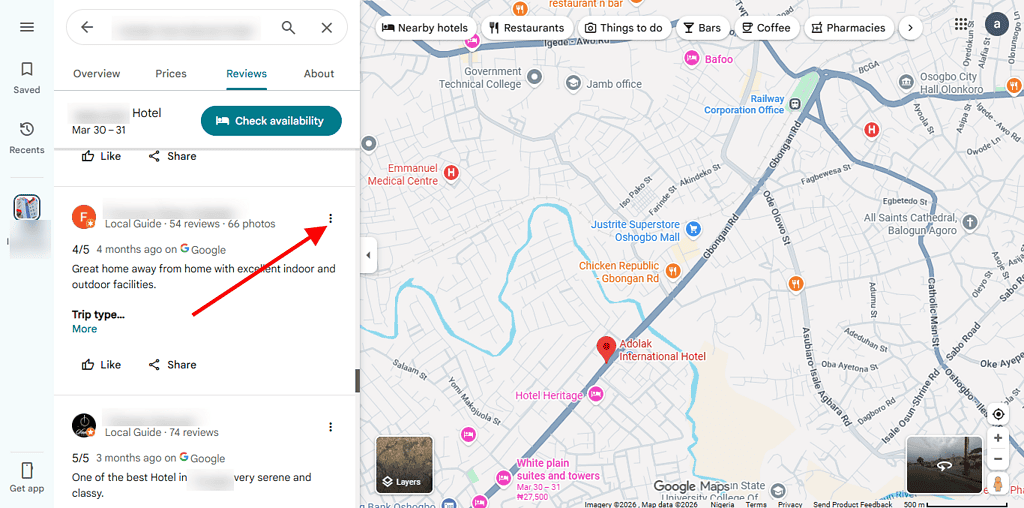
- Click the Reviews section of your Business Profile.
- Find the review you want to flag.
- Click the three dots (⋮) next to the review.

- Select “Report review.”
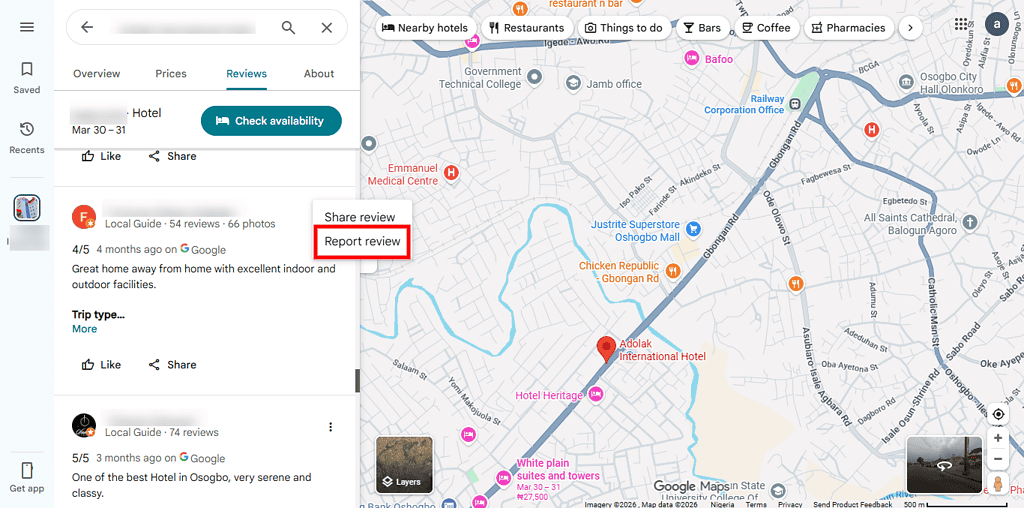
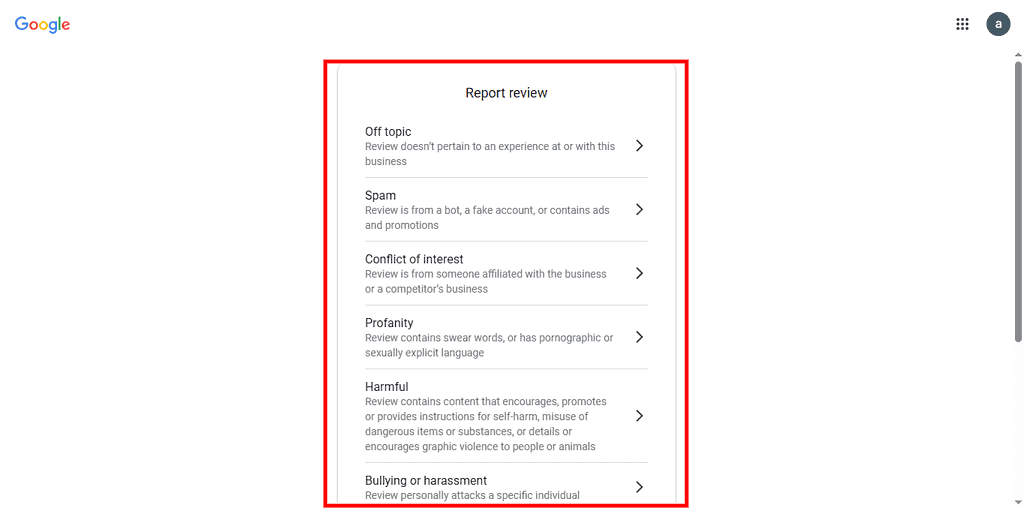
- Choose the most accurate violation category from the list.
- Click Submit.
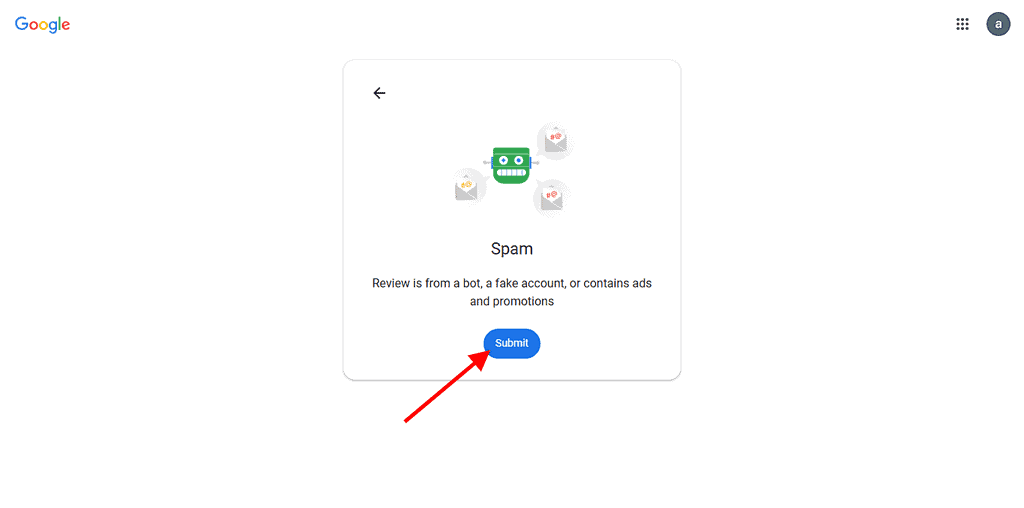


Choosing the wrong violation category is one of the most common reasons reports are rejected. Businesses must match the category as precisely as possible to the actual policy being violated. A review that contains a competitor’s advertisement should be flagged as “Conflict of interest,” not “Off-topic.”
2. On mobile (Google Maps App):
- Open Google Maps and search for your business.
- Scroll to the Reviews section.
- Find the review in question and tap the three dots (⋮) next to it.
- Tap “Report review” and select the appropriate category.
- Tap Submit.
Once submitted, Google usually reviews the case within three business days.
How to use the Google Reviews management tool
For business owners managing one or multiple locations, the Reviews Management Tool is the most efficient and trackable way to handle review reports. It allows you to monitor report status, manage multiple flagged reviews, and file appeals.
How to access it:
- Go to Google’s Reviews Management Tool directly.
- Confirm the email address linked to your Google Business Profile, or switch accounts if needed.
- Select your business location.
- Choose “Report a new review for removal.”
- Find the review, click “Report,” and select the violation reason.
- Click Submit.
The tool displays the current status of each reported review:
- Decision Pending: The review has been flagged and is awaiting evaluation.
- Report Reviewed (No Policy Violation): Google assessed the review and found no violation. The review remains live.
- Review Removed: The review was found to violate policy and has been taken down.
Always keep an internal record of problematic reviews and your actions. This documentation becomes essential if you need to escalate to an appeal.
How to file a formal appeal with Google Reviews
If Google’s initial assessment concludes that the review does not violate policy and you believe that decision is wrong, you have one opportunity to appeal. This is a formal, one-time process.
How to file an appeal:
- Return to the Reviews Management Tool.
- Select “Check the status of a review I reported previously and appeal options.”
- At the bottom of the page, click “Appeal eligible reviews.”
- Select the review (you can select up to 10 reviews per appeal).
- Click “Continue” and then “Submit an appeal.”
- Fill out the appeal form with clear evidence of the policy violation.
- Click Submit.
What makes a strong appeal:
- Be specific about which Google policy was violated and why
- Include screenshots of the review with timestamps
- If it is a fake review, provide evidence the reviewer was never a customer (e.g., no record in your CRM or booking system)
- If it is a competitor attack, document the reviewer’s connection to the competing business
- If it contains false statements of fact, provide documentary evidence contradicting the claims
Well-documented appeals significantly increase the likelihood of removal. This is especially true for competitor attacks and spam patterns. Vague appeals with no supporting documentation rarely succeed.
After submission, you will receive an email with the result. If the appeal is successful, the review will be removed. If it is upheld, the review remains live and no further review removal options are available through standard channels.
How to escalate to Google Business Profile Support
When a review removal involves mass deletions, ongoing spam attacks, or systematic fake reviews or when the standard reporting process has been exhausted, businesses can escalate directly to Google Business Profile support.
- Go to Google Business Profile Help.
- Click “Contact Us.”
- Select “Reviews” as your issue category.
- Choose your preferred support channel: email, chat, or phone (availability varies by region and account type).
Be concise and factual when contacting support. Include: your business name and GBP location, the specific reviews in question with direct links if possible, the steps you have already taken, and the reason you believe the reviews violate policy. Support agents can escalate internally in ways the automated reporting tool cannot.
What you need to know about Google’s AI Enforcement
The Google review landscape shifted significantly in 2025 and has continued evolving. Google’s Gemini AI system, deployed throughout 2024 and 2025, analyses reviews for authenticity using sophisticated pattern detection that evaluates reviewer account history, review content, timing patterns, and business-reviewer relationship signals.
The consequences have been significant on both sides:
1. Fake reviews removed at scale
Google has blocked 56 million fake reviews in recent years, and the FTC’s 2024 rule prohibiting businesses from creating, purchasing, or selling fake reviews carries civil penalties of up to $51,744 per violation. The regulatory and algorithmic environment for fake reviews is now the strictest it has ever been.
2. Legitimate reviews caught in the crossfire
Between January and July 2025, review deletion rates increased by over 600%, with nearly 2% of all monitored business locations experiencing at least one review deletion weekly at peak enforcement periods. Healthcare providers, contractors, and restaurant owners have all reported losing dozens of authentic, policy-compliant reviews to overzealous AI moderation. In such an instance, your best bet is to contact support directly.
How to handle negative reviews on Google
Managing negative reviews on Google is an essential part of protecting your brand reputation. When a negative review does not violate any Google policy, meaning removal is off the table, the most powerful tool available is a well-crafted professional response. How you respond to a negative review tells potential customers far more about your business than the review itself does.
To respond to non-removable negative reviews, follow this framework:
1. Acknowledge the experience
When responding to a negative review, the first step is to recognize the customer’s experience calmly and professionally. Avoid arguing or trying to prove the reviewer wrong in public. Studies show that defensive replies can damage your reputation further because responses are visible to potential customers.
A simple acknowledgment shows that you are listening and that customer feedback matters. It also signals professionalism and emotional control, which builds trust with future readers.
Steps to follow:
- Start by thanking the reviewer for their feedback
- Recognize their concern without debating facts
- Keep your tone neutral and respectful
- Avoid emotional or defensive language
Responding this way demonstrates that your business values feedback and is open to improvement, which positively influences how others perceive your brand.
2. Apologize where appropriate
A sincere apology is one of the most effective ways to handle negative reviews. Even if you believe the complaint is unfair, apologizing for the customer’s experience shows empathy and professionalism. Experts recommend apologizing without admitting liability, focusing instead on how the customer felt.
This approach helps calm the situation and shows that your business prioritizes customer satisfaction. It also reassures potential customers that you take concerns seriously.
Steps to follow:
- Use phrases like “We’re sorry your experience didn’t meet expectations”
- Avoid blaming the customer or making excuses
- Focus on the experience, not who is right or wrong
- Keep the apology genuine and simple
A thoughtful apology can sometimes even lead customers to update or remove their negative review after the issue is resolved.
3. Take it offline by inviting direct contact
Handling complex issues publicly can lead to unnecessary back-and-forth conversations. That is why experts strongly recommend moving the conversation offline. This allows you to resolve the issue privately and more effectively.
Taking the discussion offline also shows that you are serious about resolving the issue, not just responding for appearances. It protects your brand image and creates space for a more personal solution.
Steps to follow:
- Provide a direct contact (email or phone number)
- Invite the reviewer to continue the conversation privately
- Respond promptly once they reach out
- Offer a solution such as a fix, refund, or clarification
Example: “We’re sorry to hear your experience did not meet your expectations. We take all feedback seriously and would welcome the chance to make this right. Please contact us directly at [email/phone] so we can look into this further.”
This method often leads to better outcomes and may encourage the reviewer to revise their feedback.
4. Be brief and avoid public arguments
Keeping your response short and clear is very important. Long replies or detailed rebuttals can make your business appear defensive and unprofessional. In fact, experts warn that engaging in extended public arguments can harm your reputation more than the original review.
A concise response shows confidence and professionalism while keeping the focus on resolution rather than conflict.
Steps to follow:
- Stick to 2–4 short sentences
- Address the issue without over-explaining
- Avoid repeating the complaint in detail
- Do not engage in back-and-forth discussions publicly
Short, respectful responses are easier for readers to understand and reflect positively on your business.
FAQ
Can Google legally remove fake reviews?
Yes, Google can remove fake reviews if they violate its policies. According to Google guidelines, reviews that are spam, misleading, off-topic, or posted to manipulate ratings can be taken down. However, Google does not remove reviews simply because they are negative. If the review clearly breaks policy, it may be removed after verification.
How long does it take Google to review a flagged report?
When you report a review, Google typically takes a few days to several weeks to investigate. The timeline depends on the complexity of the case and the number of reports being processed.
In some situations, Google may not notify you directly about the outcome, so you may need to check manually. If nothing changes after some time, you can:
- Re-submit the report
- Contact support through your Google Business Profile dashboard
- Provide additional evidence if available
Patience is important, as review moderation is not always immediate.
Can I take legal action against a fake review?
Yes, in certain cases, you can take legal action especially if the review is defamatory, false, and causes harm to your business reputation. However, legal action should usually be a last resort because it can be time-consuming and costly. Regardless, if the review is seriously damaging, consult a legal professional to understand your options under local laws.
How does review spam affect my local SEO?
Review spam can negatively impact your local SEO performance. Search engines use reviews as a ranking factor, including the number, quality, and authenticity of reviews. Fake or spammy reviews can distort your rating and reduce trust in your business.
Effects of review spam include:
- Lower customer trust and credibility
- Reduced click-through rates from search results
- Potential ranking drops if spam activity is detected
Maintaining genuine, high-quality reviews and reporting suspicious ones helps protect your visibility and reputation in local search results.
Final thoughts
The Google review removal process is not designed to be easy and that is intentional. Google’s system is built to protect the integrity of genuine customer feedback, not to serve as a free reputation management tool. As a business owner, your most powerful position is one where you understand precisely which reviews qualify for removal, know how to build a strong evidence-based report and appeal, and have an ongoing strategy for generating authentic positive reviews that make any single negative one less impactful.