



Social media has fundamentally changed how businesses connect with customers, and Facebook is no different. Facebook remains one of the most powerful platforms in this mix, as it continues to be a go-to platform for brand discovery, community building, and customer engagement. Yet many business owners and marketers overlook one of the simplest and most effective tools available to them: tagging.
What does it mean to tag a business on Facebook? When you tag a business page in a post, comment, or photo, you create a clickable link that connects directly to that business’s Facebook page. It is Facebook’s built-in mention system, and learning how to tag a business on Facebook correctly can open your content to audiences far beyond your existing followers, all without spending a single dollar on ads.

This guide will help business owners, marketers, and everyday Facebook users understand exactly how tagging works, why it matters, and how to use it strategically.
Why Tagging benefits a business on Facebook
When you tag another Facebook business page in a post, your content becomes visible not only to your own followers but also to followers of the tagged page. Facebook’s algorithm recognizes the mention and may serve your post to audiences already interested in the tagged business.
1. Declining organic reach makes tagging essential
Facebook has increasingly become what marketers describe as a “pay-to-play” platform, where unpaid visibility is limited. Organic reach has been declining steadily. According to Social Status, Facebook’s organic reach in 2024 was just 1.37%, with a median engagement rate of 0.2%.
This means only a small fraction of your followers see your posts without promotion. For example, a page with 10,000 followers may reach fewer than 200 people organically. This makes it harder for brands to rely solely on their audience. Tagging a business offers a strategic way to overcome this limitation by expanding your content’s visibility beyond your immediate followers.
2. Tagging unlocks cross-audience exposure
When you tag another business page, your content gains access to a secondary audience of people who already follow or engage with that tagged brand. Facebook’s algorithm uses signals like mentions, interactions, and shared connections to distribute content to relevant users.
This means your post can appear in front of users who are already interested in similar products or services. Unlike paid ads, this kind of exposure is completely free and often more trusted because it comes through organic interaction rather than sponsored placement.
3. Tagging strengthens business relationships
Beyond visibility, tagging plays a key role in building professional relationships online. When you tag partners, vendors, or collaborators, you acknowledge their role publicly, which can foster goodwill and encourage reciprocity.
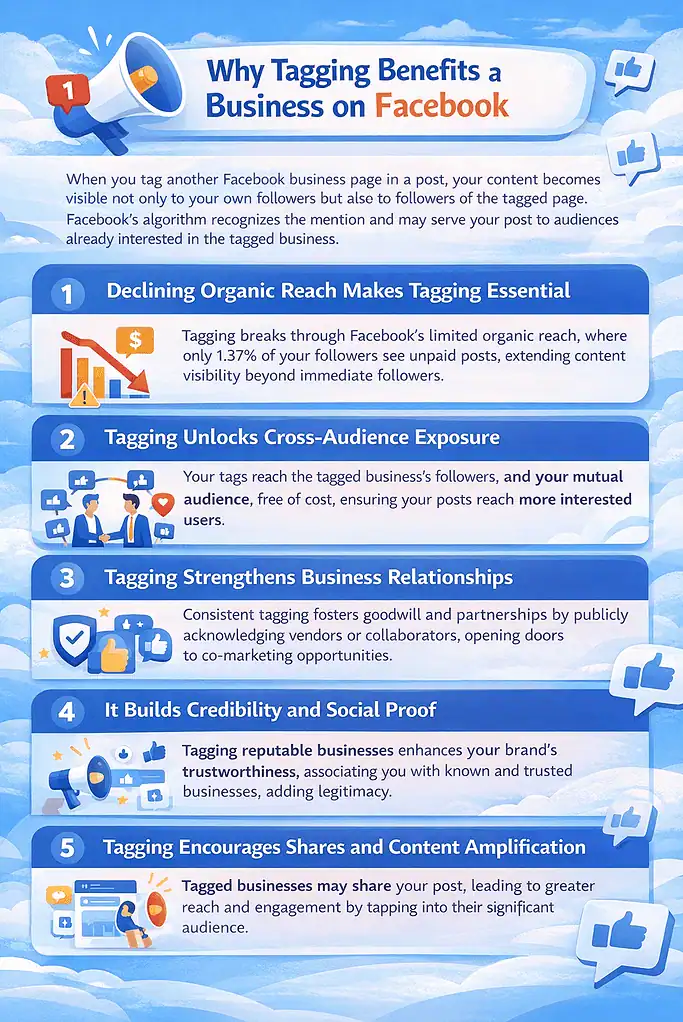
Over time, consistent tagging and interaction can lead to partnerships, co-marketing opportunities, and even referrals. In digital marketing, relationship-building is a major growth driver, and simple actions like tagging can position your brand as collaborative and community-focused.
4. It builds credibility and social proof
Tagging reputable businesses in your posts can enhance your brand’s credibility. When users see your content associated with known or trusted brands, it creates a perception of legitimacy and authority. Social proof is a powerful psychological factor in marketing, as people are more likely to trust and engage with brands that are visibly connected to others they recognize. This is especially important for smaller or growing businesses looking to establish trust quickly in competitive markets.
5. Tagging encourages shares and content amplification
One of the biggest advantages of tagging is the potential for amplification. If the tagged business chooses to share your post, your content can reach an entirely new and often larger audience. Data from social media studies shows that shared content can generate significantly higher impressions than original posts alone. This multiplier effect can dramatically increase your reach without any additional effort or cost, making tagging a highly efficient growth tactic.
6. It helps position your brand within a niche
Tagging relevant businesses also helps Facebook understand your content category and audience. The platform’s algorithm uses contextual signals such as the pages you tag to determine where your content fits. This can improve how your posts are recommended and discovered. By consistently tagging businesses within your niche, you reinforce your brand’s positioning, making it easier for the right audience to find and engage with your content over time.
Requirements before you start tagging
Before you can tag a business on Facebook, a few things need to be in place:
- The business must have a Facebook Page, not just a personal profile. You cannot tag a personal account when posting as a business page.
- Your own Facebook Page must be set up. If you want to tag your own business, you need an active business page.
- The tagged page must be public. Private or restricted pages will not appear in tag suggestions.
- You need to be logged in either to your personal account or your business account, depending on where you are posting from.
If you are posting from your personal account, you can tag business pages in statuses, photos, and comments. If you are posting as the business itself, you can tag other pages from the business account.
How to tag a business on Facebook
Tagging a business on Facebook is a simple process that helps you mention and link directly to a company’s page in your post or comment. It involves a few easy steps, such as typing the “@” symbol, selecting the correct business name, and confirming the tag before posting. By following these steps correctly, you ensure the business is properly linked and notified.
On Desktop (Web browser)
Tagging in a status update or post
- Log in to your Facebook account at facebook.com.
- Click the “What’s on your mind?” box at the top of your feed to start a new post.
- Begin typing your post. When you reach the point where you want to mention the business, type the “@” symbol immediately followed by the business name with no space between @ and the name.
- A dropdown list of matching pages and profiles will appear automatically. Scroll through and select the correct business page.
- The business name will appear highlighted in your post, confirming the tag is active.
- Add any remaining content to your post, then click “Post.”
Once published, the tag becomes a clickable blue link that directs readers straight to that business’s Facebook page.
Tagging in a comment
- Navigate to any post you want to comment on.
- Click the comment field and type the “@” symbol followed by the business name.
- Select the correct page from the suggestions dropdown.
- Finish your comment and hit Enter to post it.
Tagging a business in a photo
- Upload a photo to a new post.
- After the photo uploads, hover over it until the “Edit” option appears, then click it.
- Click “Tag Photo.”
- Click anywhere on the image, then type the name of the business (the “@” symbol is not required when tagging photos).
- Select the correct page from the dropdown, then click “Done Tagging.”
You can tag up to 50 people or pages in a single Facebook post.
On Mobile (iPhone and Android)
Tagging in a post
- Open the Facebook app and tap the “What’s on your mind?” box.
- Type your post, and when ready to tag, type the “@” symbol followed by the business name.
- A list of suggestions will appear below your text. Tap the correct business page.
- Complete your post and tap “Post.”
Tagging in a Comment on Mobile
- Open the post you want to comment on and tap the Comment field.
- Type “@” and begin typing the business name.
- Select the business from the dropdown list that appears.
- Tap Post or send to publish your comment.
The process is nearly identical across iOS and Android. If a business page does not appear in your suggestions, double-check the exact name of their page or search for it directly on Facebook first to confirm it exists.
How to use Tagging for cross-promotion on Facebook
Tagging other businesses on Facebook is a powerful organic strategy that helps you tap into new audiences without spending on ads. According to Scooter Media, tagging other pages in your posts is a proven way to get your content in front of new audiences who follow those pages, and it benefits both parties in the exchange.
This makes tagging for cross-promotion a valuable growth lever for brands that collaborate strategically. But then, how exactly can you use tagging for cross-promotion? Thankfully, there are several proven strategies for this:
1. Collaborations and partnerships
When you work with another brand on a campaign, product, or event, tagging them in your post ensures both audiences are reached. This simple action increases visibility because Facebook may show the post to followers of both pages, especially if engagement starts quickly. Co-branded content often performs better because it combines trust signals from both parties, making the message more credible and shareable.
2. Congratulations and shout-outs
Celebrating another business’s milestone, such as an anniversary, award, or product launch, creates a positive brand association while expanding your reach. When you tag them, their audience may see your post, especially if the business engages with it. Research on social media engagement shows that positive, community-driven content tends to receive higher interaction rates, which can improve your post’s performance and strengthen relationships within your niche.
3. Shared events and community activities
If your brand participates in events like fundraisers, workshops, or volunteer programs, tagging the organizers or partners adds authenticity to your content. Facebook users are more likely to engage with posts that highlight real-world activities and community involvement. Several studies show that community-focused content builds trust and increases brand recall, while tagging ensures your post reaches people already interested in similar causes.
4. Vendor or supplier mentions
Acknowledging vendors, suppliers, or service providers in your posts is a smart way to build mutually beneficial exposure. When tagged, these businesses may interact with or share your post, introducing your brand to their audience. Peer-to-peer recommendations and mentions carry strong credibility, making this type of tagging more effective than traditional advertising for building trust and awareness.
5. Customer and user-generated content tags
Encouraging customers to tag your business and tagging them back when you feature their content creates a cycle of organic promotion. User-generated content is known to drive higher engagement because it feels authentic and relatable. Consumers trust peer content significantly more than branded messaging, so tagging customers not only boosts reach but also strengthens loyalty and social proof.
6. Influencer and creator mentions
Partnering with micro-influencers or niche content creators can amplify your reach when you tag each other in posts. Smaller creators often have higher engagement rates than large accounts, making their audiences more responsive. Tagging ensures your content appears in their network, while their interaction signals relevance to Facebook’s algorithm, increasing the chances of broader distribution.
7. Product features and business spotlights
Highlighting another business in a product feature, review, or “business spotlight” post creates value-driven content that audiences appreciate. When you tag the featured brand, it encourages them to engage or re-share, extending your reach. Educational or spotlight-style posts tend to keep users engaged longer, which improves visibility and helps position your brand as collaborative and community-oriented.
8. Cross-Posting and Page Mentions in Stories
Beyond regular posts, tagging businesses in Facebook Stories or cross-posted content adds another layer of visibility. Stories appear at the top of the app and are widely consumed daily, making them ideal for quick exposure. Social media usage data shows that short-form, time-sensitive content often drives immediate engagement, and tagging within Stories increases the likelihood of reposts and direct interactions.
Best practices for tagging businesses on Facebook
Getting the mechanics right is only half the equation. Using tags strategically is what separates brands that grow from those that stay stagnant.
1. Be intentional, not random
Tagging should always have a clear purpose. Facebook’s algorithm is designed to prioritize meaningful interactions, and irrelevant tags can actually reduce your post’s reach if users ignore or hide it. When you tag businesses that are directly related to your content, such as partners, collaborators, or featured brands, you increase the chances of a response, which can significantly boost visibility and credibility.
2. Use photos whenever possible
Content with visuals consistently performs better on Facebook. Research shows that posts with images can generate up to 2–3 times more engagement than text-only updates. When you tag a business in a photo or video, it not only improves your content’s performance but also increases the likelihood of being shared or re-shared. This creates a ripple effect, exposing your post to the tagged business’s audience and expanding your organic reach beyond your immediate network.
3. Engage after tagging
Tagging is just the starting point; what you do next matters just as much. Facebook’s algorithm favors posts that spark conversations, so responding to comments, likes, or shares from the tagged business can extend your post’s lifespan. Data from social media engagement studies indicates that posts with active comment threads are more likely to be pushed to more users. By replying promptly and thoughtfully, you signal relevance and encourage further interaction.
4. Combine tagging with hashtags
While hashtags are not as dominant on Facebook as they are on platforms like Instagram or LinkedIn, they still play a role in content discovery. Using 1–3 targeted hashtags alongside your tags helps categorize your post and improves its chances of appearing in search results. According to platform usage insights, overusing hashtags can look cluttered and reduce readability, so keeping them minimal and relevant ensures better performance.
5. Disclose your connection
Transparency is essential when tagging businesses, especially if you have a personal or financial connection to them. Social media trust studies show that audiences are more likely to engage with content they perceive as honest and authentic. If you are tagging your own business or promoting a brand you are affiliated with, being upfront builds credibility. In some regions, disclosure is also encouraged by advertising guidelines, making it both an ethical and strategic best practice.
Final thoughts
Tagging a business on Facebook is a deceptively simple action with meaningful marketing potential. In an era where organic reach is shrinking and ad budgets are under pressure, every free tool that extends your visibility counts. Whether you are tagging your own business page to drive traffic, mentioning a partner to cross-promote, or recognizing a local organization to build community goodwill, each tag creates a link, sends a notification, and opens a door to a wider audience. When done right, tagging on Facebook is one of the most cost-effective engagement tools you have, and it takes less than ten seconds to use.